Transform to boolean
Description
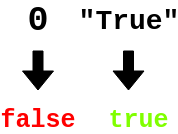
The Transform to Boolean processor converts string or number fields into boolean values. It supports:
- String to boolean conversion
- Number to boolean conversion
- Multiple field transformation
- In-place value modification
This processor is essential for:
- Converting data types
- Creating boolean flags
- Transforming values
- Standardizing data
Required input
The processor requires a data stream containing at least one string or number field to transform into a boolean.
Configuration
Transform Fields
Select one or more string or number fields to transform into boolean values. The transformation rules are:
- Strings: "true" or "1" becomes true, "false" or "0" becomes false
- Numbers: 1 or 1.0 becomes true, 0 or 0.0 becomes false
Output
The processor creates a new event containing:
- All original fields from the input event
- The selected fields with their values transformed to boolean
Example
Input Event
{
  "deviceId": "sensor01",
  "status": "true",
  "value": 1,
  "timestamp": 1586380104915
}
Configuration
- Transform Fields: status, value
Output Event
{
  "deviceId": "sensor01",
  "status": true,
  "value": true,
  "timestamp": 1586380104915
}
Use Cases
-
Data Standardization
- Convert string states
- Transform numeric flags
- Standardize values
- Create boolean flags
-
Condition Creation
- Create boolean conditions
- Transform thresholds
- Convert states
- Build flags
Notes
- Only string and number fields can be transformed
- String comparison is case-insensitive
- Numbers use 1/0 logic
- Processing is stateless
- Multiple fields can be transformed